
Time for an upgrade.
Regardless of the size of your firm, having the right tools can help you work more efficiently. Here is a rundown of some quick upgrades you can make.
Computers

Schenck Price Competes Smarter With Lexis+ With Protégé
LexisNexis sat down with John Ursin, Managing Partner at Schenck Price, to learn how the firm is using legal AI to strengthen client service and daily legal work.
As I wrote earlier, you don’t need a really powerful computer to do the things lawyers typically do. That being said, if you have a computer that is more than five years old, you should get a new one and plan on replacing your computer every few years at the most.
Let’s assume that all you do on your work computer is check your email and do word processing. As software gets more advanced, your computer needs to keep pace. For example, my first computer had Windows 3.1 and I was able to run Word on it just fine. I would not be able to load Word 2016 on that computer. If I put Word 2016 on a top-of-the-line computer I bought five years ago, it would load, but it would be sluggish. That’s half because Microsoft Office’s minimum system requirements are growing and half because of all of the other background things that we have running on our computers are growing. Software companies are assuming that your computers are getting faster, so they have been making programs that use more of your computer’s resources. Just look at a comparison between the minimum specs of the version of Microsoft Office that was available five years ago and the most recent version available today:
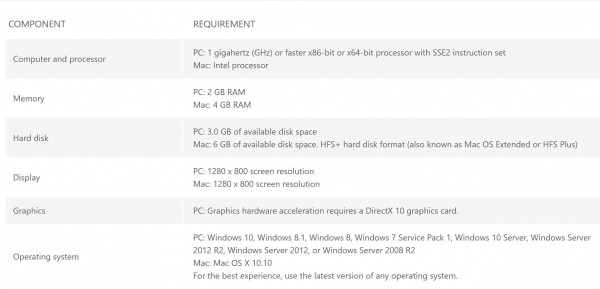
2016 Microsoft Office System Requirements from https://products.office.com/en-us/office-system-requirements

2010 Microsoft Office System Requirements from https://technet.microsoft.com/en-us/library/ee624351.aspx%28v=office.14%29?f=255&MSPPError=-2147217396

AI Built for Litigation. Verified by Design.
Grounded in authoritative content and verified at every step, Protégé is the only legal AI tool that delivers work you can trust—without exception.
Basically, the programs that we are using to type our motions are getting a lot more complex, and if you have an older computer, you are either not going to be able to take advantage of the latest software, or it will be very slow. Microsoft has a complete roadmap of the neat new features that have been rolling out and what is planned for the future here. Some of those features are really helpful, like the new Morph tool in PowerPoint or the new inking and annotation tools in Word, or the inbox sorting tools in Outlook.
Software
If you do not have a budget for software, make a budget to get Adobe Acrobat Pro. Not standard, but the pro version. Acrobat is my standard document review tool. I use it to make my documents text searchable, then I can use the annotation tools to highlight or draw a red box around the key portions of my documents. I can then go back to a document and filter it to look at just the pages with annotations. I can Bates stamp my files for production (a lot of copy companies charge per page to do this). I can also redact documents. I also use Acrobat to e-sign all of my documents.
One feature that a lot of people don’t know about is that you can edit PDFs. A lot of people will save something to PDF to keep the other side from editing the document. That works until you double click that file and go to Edit PDF.
The other day, I had a scanned version of a summons that I needed to file. The blank court form is locked from editing. You have to fill it out, print it, scan it, then e-file it. I was not near a printer and so I could not print and scan another version of the blank form. I opened the file up in Acrobat and just edited the scanned PDF to take the typo out. Not only does it let you change text, but it automatically finds the right font for you and recognizes imperfections in scanned text across the page and applies those imperfections to your edited text so that it looks natural. For example:

Try to find the changed text.
Now, if that’s scary and you don’t want people to change your PDFs like that, you can lock them from editing.
Other Hardware
Another piece of invaluable hardware is a desktop scanner. I have one that is a little bit smaller than a shoebox and can scan 100 pages at a time. I set my default scan location to be a cloud storage folder and all of my scans sync to the cloud automatically. A desktop scanner is nice because if you have a large stack of papers to scan, you can stand in line at the copy machine and then stand there and feed your documents, or you can do it at your desk and work while the files scan.
Conclusion
Your software and hardware tools are not going to make you smarter, but they will help you focus more time on moving your cases forward and less time on doing laborious but low-value tasks.
Jeff Bennion is Of Counsel at Estey & Bomberger LLP, a plaintiffs’ law firm specializing in mass torts and catastrophic injuries. He serves as a member of the Board of Directors of San Diego’s plaintiffs’ trial lawyers association, Consumer Attorneys of San Diego. He is also the Education Chair and Executive Committee member of the State Bar of California’s Law Practice Management and Technology section. He is a member of the Advisory Council and instructor at UCSD’s Litigation Technology Management program. His opinions are his own. Follow him on Twitterhere or on Facebook here, or contact him by email at [email protected].